
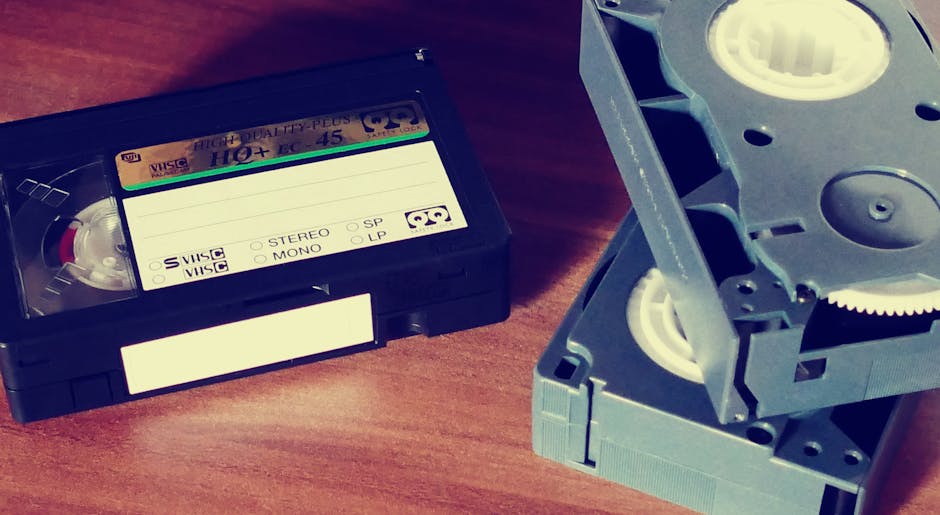
<h2>Why Preserve Your VHS Collection Now?</h2> <p>Most people in their fifties grew up with video cassette recorders (VCRs) as the primary way to watch movies and record family events. As children move out and grandchildren arrive, the desire to keep those memories intact often grows. VHS tapes degrade over time, and the equipment needed to play them becomes harder to find. Converting the tapes to digital files protects the content and makes it easier to share with family members who use smartphones or tablets.</p>
<h2>Assessing What You Have</h2> <p>Before you begin, take inventory of your tapes. Ask yourself two questions:</p> <ul> <li><strong>What is the emotional value?</strong> Prioritize home movies, milestone events, and any recordings that cannot be replaced.</li> <li><strong>What is the physical condition?</strong> Tapes that look cracked, stretched, or have mold may need professional attention.</li> </ul> <p>Separate the most important tapes from the ones you are willing to let go.</p>
DIY와 전문 서비스 중 선택
테이프를 직접 변환하거나 변환 서비스에 보내는 두 가지 주요 경로가 있습니다. 둘 다 장점이 있습니다.
DIY(Do-It-Yourself) 접근 방식
이 옵션은 비용 효율적이며 파일 형식과 명명 규칙을 완벽하게 제어할 수 있습니다. 몇 가지 기본 장비가 필요합니다:
- 작업용 VCR – 걸림 없이 테이프를 재생할 수 있는 기능적인 VCR입니다.
- 동영상 캡처 장치 – VCR의 RCA 또는 S-비디오 출력을 수신하고 아날로그 신호를 디지털로 변환하는 USB 연결 장치입니다.
- 충분한 저장 공간을 갖춘 컴퓨터 – 시간당 수 기가바이트의 비디오를 저장할 수 있는 하드 드라이브 또는 외부 SSD.
- 변환 소프트웨어 – 캡처 장치와 함께 제공되는 OBS Studio 또는 독점 소프트웨어와 같은 무료 프로그램.
업무나 취미를 위해 이미 노트북이나 데스크톱을 소유하고 있다면 저장용량이 충분할 것입니다. 외장 드라이브는 현명한 백업입니다.
전문 전환 서비스
테이프를 평판이 좋은 서비스에 보내면 특히 대규모 컬렉션이나 깨지기 쉬운 테이프의 경우 시간을 절약할 수 있습니다. 다음을 제공하는 제공업체를 찾으세요.
- 테이프당 또는 시간당 가격이 투명합니다.
- 파일 형식 옵션(MP4는 널리 호환됨).
- 안전한 취급 및 추적.
- 테이프 손상에 대한 품질 검사.
DIY 설치보다 비용이 높지만 대체할 수 없는 홈 무비를 사용하면 마음의 평화를 얻을 수 있습니다.
|||9월||| Editor's Pick · 이 기사와 관련됨 |||9월||| 킨들 무제한 |||9월||| 매 10년마다 고전 책과 회고록을 읽어보세요. 첫 달은 무료입니다. |||9월||| 세부정보 보기 → |||9월||| Amazon 관련 상점 |||9월||| 우리는 적격 구매에 대해 수수료를 받을 수 있습니다. 50세 이상 성인을 대상으로 선택되었습니다. |||9월|||단계별 DIY 전환 과정
1. 장비 설정
VCR의 출력 케이블을 캡처 장치에 연결합니다. 대부분의 VCR은 빨간색, 흰색, 노란색 RCA 커넥터를 사용합니다. 캡처 장치를 컴퓨터의 USB 포트에 연결합니다. 기기에 필요한 드라이버나 소프트웨어를 설치하세요.
|||9월|||2. 테이프 준비
테이프를 몇 초 빨리 감은 다음 되감습니다. 이렇게 하면 붙어 있는 테이프를 느슨하게 하는 데 도움이 됩니다. 테이프에서 곰팡이 냄새가 나면 재생하기 전에 이소프로필 알코올을 적신 면봉으로 VCR 헤드를 청소하는 것이 좋습니다.
|||9월|||3. 캡처 소프트웨어 구성
선택한 소프트웨어를 열고 캡처 장치를 비디오 소스로 선택합니다. 광범위한 호환성을 위해 출력 형식을 H.264 인코딩을 사용하는 MP4로 설정하세요. 원래 VHS 품질(일반적으로 NTSC의 경우 720×480)과 일치하는 해상도를 선택하세요.
|||9월|||4. 테이프 녹음
소프트웨어에서 '녹화'를 누른 다음 VCR에서 '재생'을 누르세요. 캡처 창을 모니터링하여 비디오와 오디오가 녹화되고 있는지 확인하세요. 테이프를 전체 길이로 놔두십시오. 광고 시간 동안 녹화를 일시 중지하는 것은 선택 사항이지만 나중에 편집을 단순화할 수 있습니다.
|||9월|||5. 파일 저장 및 정리
테이프가 완료되면 캡처를 중지하고 파일을 저장하세요. 이벤트, 날짜, 테이프 번호를 포함하는 명명 규칙을 사용합니다(예: "Family_Reunion_2002_Tape01.mp4"). 파일을 컴퓨터의 전용 폴더에 저장하고 외부 드라이브나 클라우드 저장소에 백업하세요.
|||9월|||6. 선택적 편집
무음 부분을 다듬거나 캡션을 추가하려는 경우 Shotcut 또는 DaVinci Resolve와 같은 무료 편집 도구를 사용하여 기본 컷을 처리할 수 있습니다. 녹음 원본의 느낌을 유지하려면 편집을 단순하게 유지하세요.
<h2>Step‑by‑Step DIY Conversion Process</h2> <h3>1. Set Up Your Equipment</h3> <p>Connect the VCR’s output cables to the capture device. Most VCRs use red, white, and yellow RCA connectors. Plug the capture device into a USB port on your computer. Install any drivers or software required by the device.</p>
<h3>2. Prepare the Tape</h3> <p>Fast‑forward the tape a few seconds, then rewind it. This helps loosen any tape that may be stuck. If the tape smells of mold, consider cleaning the VCR heads with a cotton swab dipped in isopropyl alcohol before playback.</p>
<h3>3. Configure the Capture Software</h3> <p>Open your chosen software and select the capture device as the video source. Set the output format to MP4 with H.264 encoding for broad compatibility. Choose a resolution that matches the original VHS quality (usually 720×480 for NTSC).</p>
<h3>4. Record the Tape</h3> <p>Press “Record” in the software, then press “Play” on the VCR. Monitor the capture window to ensure video and audio are being recorded. Let the tape run its full length; pausing the recording for commercial breaks is optional but can simplify later editing.</p>
<h3>5. Save and Organize Files</h3> <p>When the tape finishes, stop the capture and save the file. Use a naming convention that includes the event, date, and tape number (e.g., "Family_Reunion_2002_Tape01.mp4"). Store the files in a dedicated folder on your computer and back them up to an external drive or cloud storage.</p>
<h3>6. Optional Editing</h3> <p>If you wish to trim silent sections or add captions, free editing tools such as Shotcut or DaVinci Resolve can handle basic cuts. Keep edits simple to preserve the original feel of the recording.</p>
미래를 위한 디지털 파일 보존
동영상이 디지털화되면 다른 중요한 문서처럼 취급하세요.
- 여러 개의 백업을 만듭니다. 하나의 복사본은 외부 드라이브에 보관하고 다른 하나는 평판이 좋은 클라우드 서비스에 보관합니다.
- 일관적인 이름 지정을 유지하세요. 이렇게 하면 몇 년 후 특정 추억을 쉽게 찾을 수 있습니다.
- 공유를 고려하세요. 선택한 클립을 개인 가족 앨범에 업로드하면 손주들이 실제 테이프를 다루지 않고도 추억을 볼 수 있습니다.
저장 장치의 상태를 정기적으로 확인하세요. 데이터 손실은 조용히 일어날 수 있으며 6개월마다 빠른 확인을 통해 예상치 못한 상황을 방지할 수 있습니다.
|||9월|||향수와 실용성의 균형
정규직에서 보다 유연한 일정으로 전환하면 개인 프로젝트에 더 많은 시간을 할애할 수 있습니다. VHS 테이프를 변환하면 과거의 감성적 가치와 현대 기술의 편리함이 결합됩니다. 이 가이드를 따르면 가족 역사를 보호하고 물리적 저장 공간을 확보하며 향후 수십 년 동안 즐길 수 있는 디지털 아카이브를 만들 수 있습니다.
|||9월||| 실제 IQ 평가 |||9월||| 학교 퀴즈가 아닌, 수십 년의 생활을 통해 얻은 실용적인 지능을 테스트해 보세요. |||9월||| 실제 세계 IQ를 가져보세요 |||9월||| 당신에게 추천 |||9월||| 이 기사와 관련된 엄선된 리소스 |||9월||| 책 |||9월||| Bookshop.org |||9월||| 지역 독립서점을 지원하면서 향수를 불러일으키는 책을 구매해보세요. |||9월||| 배우다 |||9월||| 마스터클래스 |||9월||| 음악, 영화, 스포츠, 역사 전반에 걸쳐 전설적인 인물들의 이야기와 교훈을 들어보세요. |||9월||| 제휴사 공개: 당사는 귀하에게 무료로 수수료를 받을 수 있습니다. |||9월||| 노스탤지어에서 더 보기 |||9월||| 홈 엔터테인먼트를 위한 1990년대 노래방 기계의 부활<h2>Balancing Nostalgia with Practicality</h2> <p>Transitioning from a full‑time career to a more flexible schedule often means you have more time for personal projects. Converting VHS tapes blends the sentimental value of the past with the convenience of modern technology. By following this guide, you protect family history, free up physical storage space, and create a digital archive that can be enjoyed for decades to come.</p>