
Apple Pay Scam Text Claims Fake 8250 Charge With 35 Minute Deadline
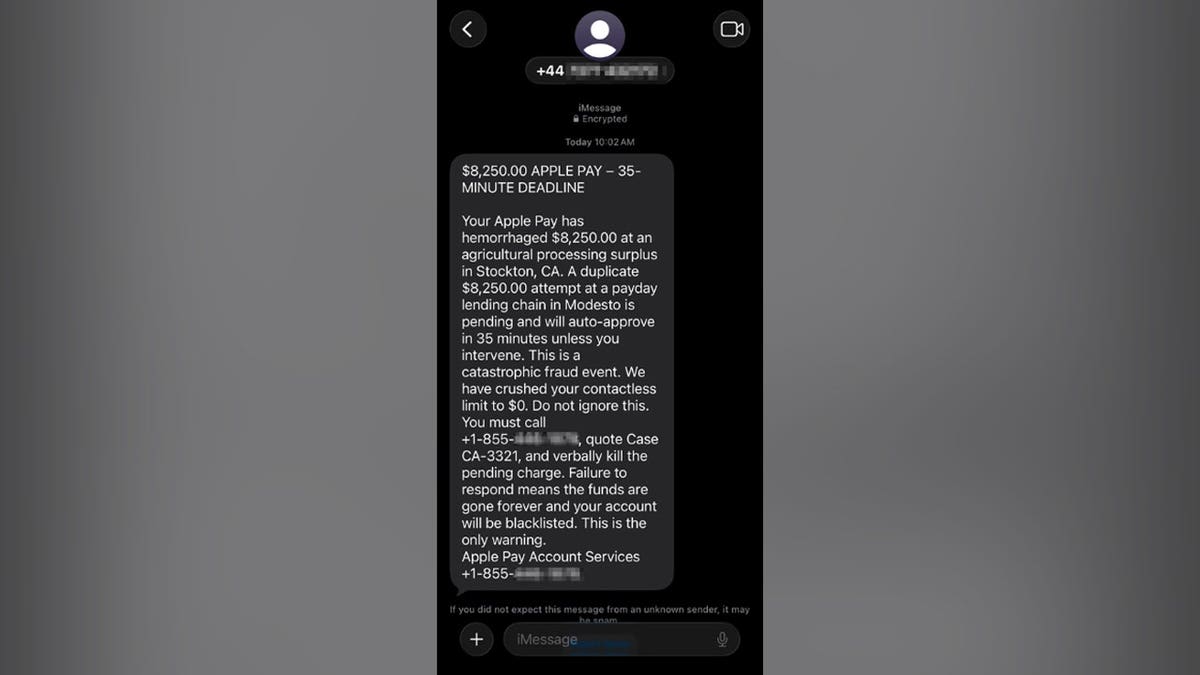
A Washington, D.C., resident received a text claiming Apple Pay charged $8,250 and that another charge would auto-approve in 35 minutes. Security writers say the message uses panic and a callback number to steer people into a phone scam.
A Washington, D.C., man identified as Paul C. got a text that said Apple Pay had already charged him $8,250 and that a second $8,250 charge would auto-approve in 35 minutes. The message told him to call an 855 number, quote a case code, and cancel the pending charge by phone.
Fox News Digital CyberGuy Kurt Knutsson reviewed the text after Paul refused the callback and reported it. The sender number began with +44, the country code for the United Kingdom, while the message claimed to come from Apple Pay Account Services and directed a U.S. reader to a separate toll-free line.
The wording used fear on purpose. It called the event a catastrophic fraud event, said the account had hemorrhaged money, and claimed contactless limits had been crushed to zero. At the same time it warned a second large charge would still go through. The alleged merchants were described in vague terms, including an agricultural processing surplus in Stockton, California, and a payday lending chain in Modesto, rather than real store names.
Knutsson said those details are classic callback bait. Once someone dials the number, a scammer can ask for card numbers, Apple Account email, one-time codes, or remote-access software. The Federal Trade Commission has warned that fake support agents may steal credentials or push victims to move money into so-called safe accounts.
Apple and banks do not ask people to kill charges by calling a number from an unexpected text. The safer path is to open the Wallet app, select the card, review Transactions, then check the bank or card issuer app. If something looks wrong, call the number printed on the physical card.
Before deleting a fake message, save a screenshot with the sender info. On iPhone, report the text as junk or spam, block the sender, forward it to 7726 (SPAM), and email the screenshot to reportphishing@apple.com. The FTC also takes reports at ReportFraud.ftc.gov.
If you already called, hang up. If you shared a card number, contact the bank through its official app or the number on the card. If you shared an Apple password or verification code, change the password, confirm two-factor authentication is on, and review devices on the account. If remote-access software was installed, disconnect from the internet, remove the tool, and run a full security scan from a trusted device.
Go Deeper
How can I tell an Apple Pay fraud text is fake?
Look for overseas sender codes, a separate callback number, a tight countdown, and dramatic language. Real alerts rarely invent vague merchant descriptions or demand an immediate phone call to a number inside the text.
What should I do first if I get this message?
Do not call or reply. Open Wallet and your bank app to check recent charges. If needed, call the number printed on your card.
Why do scammers use a 35-minute deadline?
A short clock pushes people to act before they verify anything. Legitimate fraud teams still work if you take a few minutes to check through official channels.
Is an encrypted blue iMessage proof Apple sent it?
No. Encryption only protects the path between devices. It does not prove the sender is Apple or your bank.
Where do I report a fake Apple text?
Report junk in Messages, forward the text to 7726, email a screenshot to reportphishing@apple.com, and file a report at ReportFraud.ftc.gov.
More us
 us
usIran Sets New Terms for Reopening the Strait of Hormuz
Iran has laid out new terms for reopening the Strait of Hormuz, a vital shipping route. President Trump stated that the U.S. is only 'semi-negotiating
Aug 10us50+FAA Hires Airspace Software Firm Used by Alaska Airlines for National Reboot
NPR reports the Federal Aviation Administration has hired Air Space Intelligence, a startup already used by Alaska Airlines to optimize operations, fo
Aug 10 us
usMark Zuckerberg's Superyacht Did Not Assist Stranded Boat in Alaska
Mark Zuckerberg's $300 million superyacht did not help passengers stuck on a ship in Alaskan waters. The incident has raised questions about the actio
Aug 10